
How to Trace and Debug Multi-Agent Systems: A Production Guide to Multi-Agent Observability
Learn how to implement distributed tracing, debug LLM agent failures, and monitor multi-agent AI systems in production using OpenTelemetry and automated evaluation.

Your multi-agent system works fine locally. Three agents coordinate, call tools, pass context, and return a clean answer. Then you deploy to production and something breaks. The final output is wrong, but you have no idea which agent failed, which tool call returned garbage, or where the reasoning chain fell apart. This is the core problem multi-agent observability solves.
Multi-agent systems introduce failure modes that single-agent setups never face. Agents hand off tasks, share state, call external APIs, and make independent decisions. When one agent hallucinates or a tool call times out, that error cascades silently through the rest of the chain. Traditional logging gives you fragments. Distributed tracing for AI agents gives you the full picture: every decision, every tool invocation, and every token spent across your entire agent workflow.
This guide covers how to trace multi-agent workflows end to end, how to debug AI agents when they fail in production, and how to build an observability stack that catches silent failures before your users do.
Why AI Agents Fail in Production
Multi-agent systems break differently than traditional software. Before setting up tracing, it helps to understand the failure categories that appear most often in production.
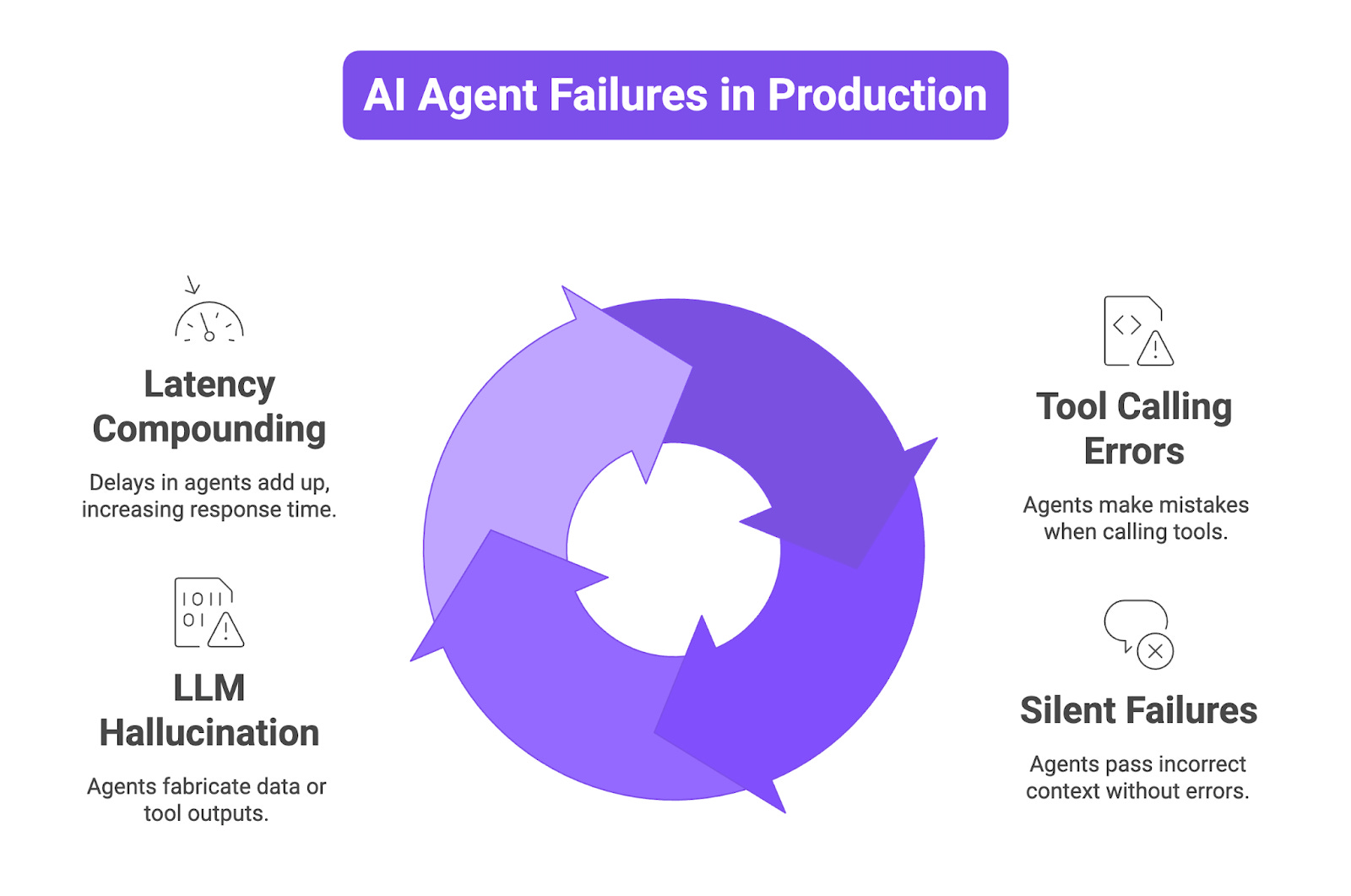
Tool calling errors are the most common. An agent decides to call a function but the parameters are malformed. The tool returns an error, and the agent either retries incorrectly or ignores the failure and hallucinates an answer. Without tool call tracing for LLM agents, you will never see this happen.
Silent failures are harder to catch. Agent A passes context to Agent B, but the context is incomplete or irrelevant. Agent B produces a confident but wrong response. No error is thrown, no exception is logged, and your monitoring dashboard stays green while the user gets a bad answer.
Hallucination in multi-step workflows becomes critical when agents fabricate tool outputs or invent data they never retrieved. A hallucination in step 2 corrupts every subsequent step. Standard logs show the final output but not where the fabrication originated.
Latency compounding is another production problem. Each agent in a chain adds latency. If your orchestrator waits for a planner, a retriever, and a summarizer, a 2-second delay in any one of them can push total response time past user tolerance. Diagnosing this requires span-level timing data that traditional monitoring tools do not provide.
The Trace and Span Hierarchy for Agent Systems
A trace represents one complete execution of your agent system, from the initial user query to the final response. Within that trace, each operation gets a span. In multi-agent systems, the span hierarchy works like this:
Root Span captures the full agent workflow execution, e.g.,
invoke_agent triage_agentAgent Span captures an individual agent’s processing, e.g.,
invoke_agent research_agentLLM Span captures a single model call, e.g.,
chat gpt-5Tool Span captures an external tool or API invocation, e.g.,
execute_tool web_searchRetriever Span captures a vector DB or knowledge base query, e.g.,
retrieve context_storeEmbedding Span captures embedding generation, e.g.,
embed text-embedding-3-small
Each span carries attributes including input tokens, output tokens, latency, model name, status code, and error type. When Agent A hands off to Agent B, the child span links back to the parent, preserving the full execution tree. Here is what a complete trace tree looks like for a customer support system handling the query “What is the status of my order #4521?”:
Trace: abc-123
└── invoke_agent triage_agent [4.2s]
    ├── chat gpt-5 [600ms] → decides to route to order_lookup_agent
    ├── invoke_agent order_lookup_agent [2.8s]
    │   ├── execute_tool order_api [1.9s] → GET /orders/4521
    │   └── chat gpt-5 [900ms] → formats order data into natural language
    └── invoke_agent response_agent [800ms]
        └── chat gpt-5 [800ms] → composes final user-facing reply
Every span in this tree is inspectable. If the final answer is wrong, you walk backward: did the response agent misinterpret the data? Did the order API return stale information? Did the triage agent route incorrectly? The trace gives you full chain of custody for every piece of information.
The industry is converging on OpenTelemetry (OTel) as the standard for collecting this telemetry data. The OpenTelemetry GenAI SIG has defined specific span operations like invoke_agent, create_agent, and execute_tool, along with standardized attributes like gen_ai.agent.name, gen_ai.request.model, and gen_ai.usage.input_tokens.
How to Set Up Multi-Agent Observability
Setting up multi-agent observability involves three layers: instrumentation, collection, and visualization.
Step 1: Instrument Your Agent Code
There are three paths to instrument your agents.
Manual OpenTelemetry instrumentation gives you full control. You create a TracerProvider, configure an OTLP exporter, and wrap your agent logic in custom spans. This is the most flexible option but also the most labor-intensive. Here is a minimal setup for an agent call:
from opentelemetry import trace
from opentelemetry.sdk.trace import TracerProvider
from opentelemetry.sdk.trace.export import BatchSpanProcessor
from opentelemetry.exporter.otlp.proto.grpc.trace_exporter import OTLPSpanExporter

provider = TracerProvider()
provider.add_span_processor(BatchSpanProcessor(OTLPSpanExporter()))
trace.set_tracer_provider(provider)
tracer = trace.get_tracer("multi-agent-app")

with tracer.start_as_current_span("invoke_agent triage_agent") as span:
    span.set_attribute("gen_ai.agent.name", "triage_agent")
    span.set_attribute("gen_ai.request.model", "gpt-5")
    # your agent logic here
    with tracer.start_as_current_span("execute_tool web_search") as tool_span:
        tool_span.set_attribute("gen_ai.tool.name", "web_search")
        # tool call logic here
This approach works but gets tedious in multi-agent setups with dozens of tool calls and handoffs.
Framework-native tracing is another option. LangChain has LangSmith callbacks, CrewAI emits telemetry events, and the OpenAI Agents SDK supports trace collection natively. These work well within a single framework but produce fragmented traces when you run multiple frameworks in the same system.
Auto-instrumentation libraries are the most scalable approach for production. They patch supported frameworks at runtime and emit standardized OpenTelemetry spans automatically, with no changes to your agent logic. Using Future AGI’s open-source TraceAI library, you can instrument an OpenAI-based agent in a few lines:
from fi_instrumentation import register
from fi_instrumentation.fi_types import ProjectType
from traceai_openai import OpenAIInstrumentor

trace_provider = register(
    project_type=ProjectType.OBSERVE,
    project_name="my_agent_project",
)

OpenAIInstrumentor().instrument(tracer_provider=trace_provider)
From this point, every LLM call, tool invocation, and retriever hit is automatically captured as spans. For multi-agent setups using the OpenAI Agents SDK, add the agents instrumentor:
from traceai_openai_agents import OpenAIAgentsInstrumentor
from traceai_mcp import MCPInstrumentor

OpenAIAgentsInstrumentor().instrument(tracer_provider=trace_provider)
MCPInstrumentor().instrument(tracer_provider=trace_provider)
This captures agent-to-agent handoffs, MCP tool calls, and the full execution graph across your multi-agent system.
Step 2: Export Traces to a Backend
TraceAI exports to any OpenTelemetry-compatible backend including Jaeger, Grafana Tempo, Datadog, or Future AGI’s Observe platform. Traces flow through the standard OTLP (OpenTelemetry Protocol) pipeline, so you are not locked into any single vendor.
Step 3: Visualize and Analyze
Once traces land in your backend, you can view each agent run as a nested timeline. Each node in the waterfall view represents a span you can click into to inspect its input, output, latency, token count, and error status. When a user reports a bad answer, you pull up the trace, walk the span tree, and find the exact point where reasoning went wrong.
Debugging Common Multi-Agent Failures
Tool Calling Errors
When an agent calls a tool and gets an error, the tool span will show a non-success status code. Check in this order: first, inspect the tool span’s input attributes to verify the parameters; second, check the span’s output to see if the tool returned an error; third, look at the next LLM span to see how the agent reacted. Here is a real example from a booking agent calling flight_search:
Span: execute_tool flight_search
Status: ERROR
Attributes:
  gen_ai.tool.name: flight_search
  tool.input: {"origin": "NYC", "destination": "", "date": "2026-03-15"}
  tool.output: {"error": "destination is required"}
  gen_ai.agent.name: booking_agent
The destination field is empty. You go one span up to the LLM call that generated this invocation:
Span: chat gpt-5
Attributes:
  gen_ai.request.model: gpt-5
  llm.input: "User wants to fly from New York to somewhere warm next week"
  llm.output: {"tool_call": "flight_search", "args": {"origin": "NYC", "destination": "", "date": "2026-03-15"}}
The model could not resolve “somewhere warm” into a concrete destination and passed an empty string instead of asking for clarification. The fix is a prompt-level change: instruct the agent to ask the user for a specific destination when the query is ambiguous. Without span-level trace data, your logs would only show “flight_search failed” with no visibility into why.
Hallucination in Multi-Step Workflows
Hallucination debugging requires comparing what the retriever actually returned against what the agent claimed. Open the retriever span and check the retrieved documents, then open the subsequent LLM span and check the output. Here is what a hallucination looks like in trace data:
Span: retrieve context_store
Attributes:
  retriever.query: "Q1 2026 revenue for Acme Corp"
  retriever.documents: [
    "Acme Corp reported $42M in Q1 2026 revenue, a 12% increase YoY."
  ]
Span: chat gpt-5
Attributes:
  gen_ai.request.model: gpt-5
  llm.input: [retrieved context + user query]
  llm.output: "Acme Corp reported $42M in Q1 2026 revenue, a 12% increase YoY,
               driven primarily by expansion into the European market."
The “driven primarily by expansion into the European market” detail appears nowhere in the retrieved documents. In a multi-agent pipeline, this fabricated detail gets passed downstream as factual input, and the error compounds silently.
Automated evaluation metrics from Future AGI’s evaluation suite can flag this automatically using LLM-as-judge. These evaluators compare each LLM span’s output against the retriever span’s documents and assign a faithfulness score. When that score drops below your threshold (say 0.85), the trace is flagged for review, turning hallucination detection into an automated quality gate that runs on every execution.
Latency Issues
Sort spans by duration in the waterfall view to immediately identify the bottleneck. For example, your customer support pipeline’s P95 latency jumps from 4 seconds to 11 seconds. You pull up a slow trace:
invoke_agent triage_agent [200ms]
├── chat gpt-5 [800ms]
├── invoke_agent retriever_agent [6200ms] ← bottleneck
│   ├── retrieve vector_store [5900ms]
│   └── chat gpt-5 [300ms]
└── invoke_agent summarizer_agent [1800ms]
    └── chat gpt-5 [1800ms]
The retriever agent’s vector store query is taking 5.9 seconds. Checking the span attributes reveals it is querying an unindexed collection of 2M+ documents with top_k=50. The fix is indexing the collection, reducing top_k, or adding a metadata pre-filter. Without span-level timing, you would only know the pipeline was slow, not which step caused it.
Evaluating Multi-Agent System Output
Tracing tells you what happened. Evaluation tells you if it was good. The key metrics to track are:
Task Completion Rate: the percentage of queries where the final output correctly answers the user
Tool Accuracy: the percentage of tool calls with correct parameters and valid responses
Faithfulness Score: whether the output matches retrieved context, comparing retriever span documents against LLM output
End-to-End Latency: total time from query to response, measured from root span duration
Cost per Query: total token spend across all agents, summed from all LLM spans
Agent Handoff Success Rate: the percentage of inter-agent handoffs that preserve required context
When faithfulness drops, your retriever or grounding prompt needs work. When tool accuracy dips, check for schema changes or API regressions. Set up alerts for latency spikes beyond your SLA, error rate increases in tool spans, quality score drops in evaluation runs, and token cost anomalies that often signal agent loops. Future AGI’s monitoring module supports OTEL-powered dashboards with configurable thresholds per agent within a multi-agent chain.
Best Practices for Production Multi-Agent Tracing
Instrument from day one. Adding tracing after a production incident is significantly harder than building it in from the start.
Name spans descriptively. Use
research_agent:web_searchinstead of generictool_call. Clear span names save time during debugging.Separate environments with project versions. Use distinct project names for dev, staging, and production to prevent test data from polluting production dashboards.
Trace agent state, not just inputs and outputs. If your agents maintain memory between steps, capture state transitions as span attributes.
Combine tracing with automated evaluation. Raw traces give you the “what.” Automated evaluations give you the “how good.” Together, they tell the full story.
Use consistent span attributes across frameworks. If you run LangChain and CrewAI in the same system, ensure both emit spans using the same OTel attribute schema.
How Multi-Agent Observability with Future AGI Works
Future AGI provides a complete observability and evaluation layer built specifically for multi-agent systems. Its open-source TraceAI library instruments 15+ frameworks including OpenAI, Anthropic, LangChain, CrewAI, DSPy, and Pydantic AI, with auto-instrumentation that requires zero changes to your agent code.
The platform’s Agent Compass feature automatically clusters errors, identifies root causes using a built-in error taxonomy, and suggests fixes. Instead of manually reading through thousands of traces, you get grouped failure patterns with actionable diagnostics. For evaluation, Future AGI provides over 50 ready-to-use metrics covering hallucination detection, context adherence scoring, and tool accuracy, all running directly inside your production traces without a separate evaluation pipeline.
For teams running multi-step agent workflow monitoring at scale, Future AGI’s Observe module tracks throughput, error rates, latency distributions, and cost per query across your entire agent fleet with customizable alert thresholds.
Frequently Asked Questions
How do you debug LLM agent chains when errors do not throw exceptions?
Silent failures happen when an agent produces a confident but incorrect response without raising an error. The only way to catch these is through span-level tracing combined with automated evaluation metrics like faithfulness scoring and context adherence checks.
What is the difference between logging and distributed tracing for AI agents?
Traditional logging records individual events in isolation, while distributed tracing connects every step of a multi-agent workflow into a single execution tree. Tracing preserves parent-child relationships between agent calls, tool invocations, and LLM requests so you can follow the entire reasoning path.
How does multi-agent observability with Future AGI differ from standard monitoring tools?
Future AGI’s Agent Compass automatically clusters agent failures, identifies root causes using an error taxonomy, and suggests actionable fixes, while standard monitoring tools only display raw trace data and leave diagnosis to the developer. It also provides inline evaluations and OTEL-powered dashboards built specifically for multi-agent systems.
What are the most important evaluation metrics for multi-agent systems?
The five critical metrics are task completion rate, tool call accuracy, faithfulness score (output vs. retrieved context), end-to-end latency, and cost per query. Tracking these over time helps you detect performance regressions and prioritize optimization efforts.
Can you trace agent tool calls and API responses across different frameworks?
Yes. OpenTelemetry-based instrumentation libraries such as TraceAI provide framework-agnostic tracing that picks up tool calls and API responses across LangChain, CrewAI, the OpenAI Agents SDK, and other frameworks through a consistent span schema, which is what makes cross-framework debugging practical.
How do you set up alerts for agent quality drift in production?
Monitor automated evaluation scores (faithfulness, relevance, safety) alongside operational metrics (latency, error rate, token cost) on your observability platform. When any metric crosses a configured threshold, the system triggers a notification so you can investigate before users are impacted.
The local-to-production gap in multi-agent systems is brutal. Three agents coordinate perfectly in dev, then one misfires in prod and you have no visibility into why.
OpenTelemetry for this is the right call. Went through a version of this with my own setup - built a flat-file state log before finding proper tooling. Running Claude with computer use made it more obvious where agent coordination was breaking (https://thoughts.jock.pl/p/claude-cowork-dispatch-computer-use-honest-agent-review-2026).
The automated evaluation part is where I'm still figuring things out. How are you handling evaluation when expected output isn't well-defined?