
How to Implement Voice AI Observability for Real-Time Production Monitoring
Track P95 latency, WER, and conversation quality metrics to catch voice agent failures before customers do.

Introduction
Voice AI agents now handle thousands of calls daily, yet most teams only find out about failures after customers have hung up. Standard APM tools track response times and error rates, but they miss what actually breaks in voice systems: conversation quality. Your infrastructure metrics can show green across the board while users abandon calls because your agent misclassifies intent or loses dialog state.
Voice AI operates differently from web applications. You’re managing multi-turn conversations that maintain context across exchanges, real-time audio streams with latency variables, and LLM inference chains that behave probabilistically. Traditional monitoring tools can’t detect when your model starts drifting or when semantic accuracy drops below acceptable thresholds.
Performance drift sneaks in as your agent encounters new accents, background noise patterns, or edge cases outside your training data. By the time customer complaints surface, you’ve already lost trust and revenue. This guide walks through how to build voice AI observability that catches issues before customers do.
Core Metrics Every Voice AI Team Should Track
Voice AI monitoring isn’t about tracking one “golden signal.” You need to correlate performance across four dimensions.
Latency Metrics
Time-to-First-Byte (TTFB): Measure the delay between user silence and the first audio packet returned by your agent. According to Gladia’s speech latency documentation, TTFB directly affects how “snappy” your voice agent feels. Target P95 TTFB under 300ms for interactive agents.
End-to-End Turn Latency: Track total time from user input to agent response completion, including transcription, LLM inference, and TTS generation. Vapi’s latency research suggests targeting P50 under 500ms and P95 under 800ms for natural conversation flow.
TTS Processing Lag: Monitor the delta between text generation and audio rendering to catch bottlenecks in your synthesis pipeline.
Quality Metrics
Word Error Rate (WER): Calculate transcription accuracy by comparing ASR output against ground-truth logs. WER measures the ratio of recognition errors (substitutions, deletions, insertions) to total words. According to Microsoft’s speech documentation, a WER of 5-10% indicates good quality, while 20% or higher signals need for additional training.
Intent Classification Confidence: Track the model’s confidence scores for intent recognition to spot vague queries or training data gaps.
Task Success Rate: Measure the percentage of conversations where the user’s primary goal (booking an appointment, resolving a support issue) was completed without human intervention.
Business Metrics
Average Handle Time (AHT): Monitor session duration to ensure agents resolve issues efficiently rather than trapping users in loops.
First Contact Resolution (FCR): Track how often users’ issues get solved in a single session without needing a callback.
Escalation Rate: Measure handoff frequency to human agents, differentiating between planned and failure-driven escalations.
Audio Metrics
Mean Opinion Score (MOS): Use automated algorithms to estimate audio clarity and quality on a scale of 1-5, flagging calls that sound robotic or distorted.
Jitter and Packet Loss: Monitor network stability metrics that cause choppy audio or robotic artifacts during real-time streaming.
Barge-in Failure Rate: Track instances where the agent failed to stop speaking when the user interrupted. This is a key driver of poor experience.
Setting Alert Thresholds That Actually Matter
Your dashboard is useless if it lights up red for every minor fluctuation. You need actionable alerts that distinguish between noise and actual degradation.
P95 Latency vs. Average Latency Alerts
Average latency hides the frustration of your “tail” users. As Hamming AI’s latency optimization guide notes, a 300ms average latency may appear successful while 10% of calls spike to 1500ms. If 5% of your calls have 3-second delays, that’s hundreds of angry customers daily, even when your average looks fine.
Average Latency tracks mean response time across all calls. It’s good for long-term trending but masks intermittent spikes that ruin user trust.
P95/P99 Latency tracks the experience of your slowest 5% or 1% of users. This is critical for detecting edge cases, regional outages, or complex queries causing timeouts.
Spike Duration measures how long latency stays elevated above a threshold. This differentiates momentary network outages from sustained infrastructure failures.
Anomaly Detection vs. Static Thresholds
Static thresholds work for hard limits (like server down), but they fail for metrics that naturally fluctuate with traffic patterns.
Static Thresholds use hard limits like “Alert if latency > 800ms.” They work best for SLAs, hard infrastructure limits, and binary up/down checks. The downside: they require manual tuning as your system scales.
Anomaly Detection uses adaptive baselines based on historical patterns. It excels at detecting subtle drift, seasonal traffic spikes, and unknown unknowns. The system automatically adjusts to new normal patterns over time, reducing maintenance overhead.
Alert Fatigue: How to Avoid Noise While Catching Real Issues
Alert fatigue destroys on-call sanity. Instead of alerting on every raw metric spike, group related alerts into incidents and route them based on severity. Page engineers only for sustained P95 degradation or widespread error spikes, while logging transient jitter warnings for later review.
Setting Up Voice AI Observability with Future AGI
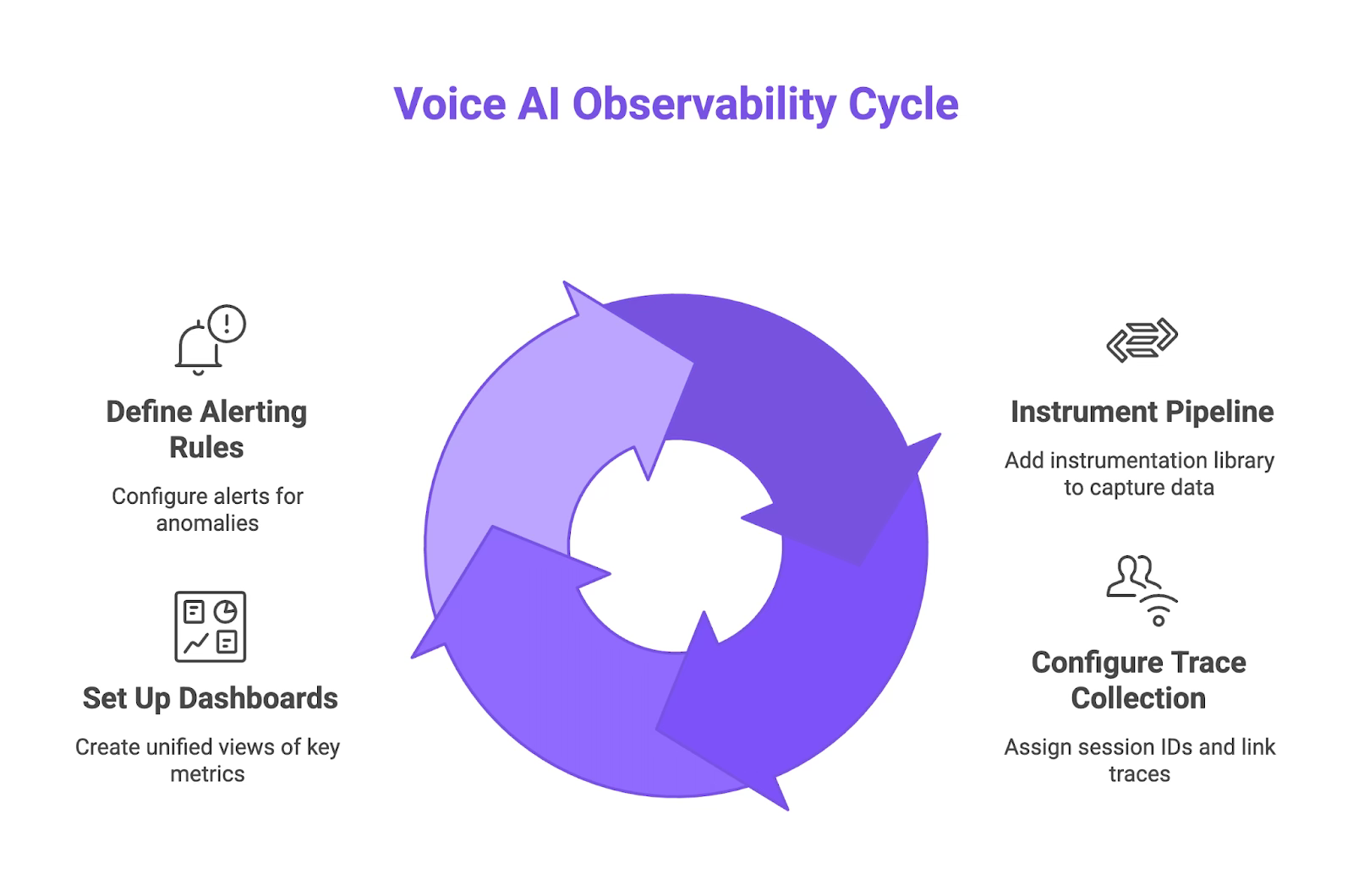
Step 1: Instrument Your Voice Pipeline
Add instrumentation to your voice pipeline that wraps your existing OpenAI, Anthropic, or custom LLM calls. The SDK should automatically capture audio input, transcription output, LLM reasoning steps, and TTS generation without requiring you to manually log each component.
Step 2: Configure Trace Collection for Conversation Flows
Assign a unique session ID to each conversation and link all traces (user turns, agent responses, tool calls) under that session for complete multi-turn visibility. Define what constitutes a “session” based on your use case: a single phone call, a 24-hour window, or until the user explicitly ends the conversation.
Step 3: Set Up Dashboards for Key Metrics
Build dashboards that surface latency percentiles, audio quality scores, task completion rates, and business metrics like escalation frequency in one unified view. Filter by time range, user segment, or specific conversation types.
Step 4: Define Alerting Rules and Anomaly Detection
Configure alerts based on P95 latency thresholds, sudden drops in task success rate, or spikes in audio quality degradation. The platform should learn your normal traffic patterns and automatically adjust baselines, so you only get paged when something genuinely breaks.
Tracing Conversations: From First Word to Resolution
End-to-End Conversation Tracing
Session-level visibility: Every conversation gets a unique session ID that links all user turns, agent responses, tool calls, and audio events under one trace. You can replay the entire interaction from start to finish.
Component-level breakdown: Each trace breaks down latency by component (STT processing time, LLM inference duration, TTS generation lag) to pinpoint exactly where delays accumulate.
Linking Audio Events to LLM Calls
Causality chains: When your agent makes a tool call to check inventory or book an appointment, the trace connects that action back to the specific audio input that triggered it.
Failure chains: When your audio stream has network issues like jitter or packet loss, your STT service mishears the user. Those transcription mistakes mean your LLM gets the wrong text and calls the wrong tool.
Debugging Specific Conversation Failures
Search and replay: When a user reports a bad interaction, search for their conversation by session ID, inspect the full trace, and see exactly where your agent misunderstood input.
Confidence score tracking: Configure evaluations to capture confidence scores at each step. Set thresholds for each component so you can filter conversations where low confidence led to failures.
Anomaly Detection: Catching Drift Before Customers Do
What Causes Performance Drift?
Performance drift creeps in when training data stops reflecting production reality. Common causes include model version updates that change inference behavior, shifts in customer language patterns (new slang, regional accents, industry jargon), or infrastructure changes like switching STT providers. Voice AI agents encounter seasonal variations and edge cases not in initial training sets, causing accuracy degradation that compounds over weeks.
Real Example: Catching a 4% Accuracy Drift
A voice agent handling insurance claims showed a 4% drop in intent classification accuracy over two weeks. The cause: customers adopted new terminology like “virtual inspection” instead of “photo claim” after a marketing campaign. Manual monitoring would have missed this gradual decline. Automated anomaly detection flagged the confidence score drop and escalated before the accuracy dip caused business impact.
When anomaly detection spots drift, it should correlate across multiple dimensions (latency, accuracy, confidence scores, user demographics) to pinpoint root causes. You get actionable feedback showing which specific conversation types or user inputs trigger failures.
Building Observability Into Your Voice AI Workflow
Connecting Observability to Pre-Production Testing
Observability shouldn’t start at deployment. Run thousands of synthetic test conversations against your voice agent before launch, evaluating actual audio output for latency spikes, tone inconsistencies, and quality degradation that transcripts miss. Catch the 800ms latency spike during testing instead of discovering it through customer complaints.
Using Production Data to Improve Test Scenarios
The best test scenarios come from real failures. Capture production traces showing where conversations break down, then feed those edge cases back into your pre-production test suite. Synthetic test generation works for coverage, but production logs reveal specific accent variations, background noise patterns, and unexpected phrasings that cause real failures.
The Continuous Improvement Loop
Observe: Monitor production traffic in real time to identify patterns in failed conversations, low confidence scores, high latency outliers, or drops in task completion rates.
Evaluate: Run targeted experiments comparing different prompts, model versions, or pipeline configurations against production-like scenarios using golden datasets derived from real user interactions.
Optimize: Deploy changes incrementally, track metrics before and after, and feed evaluation results back into your training data and observability baselines.
Team Workflows
Engineers get real-time alerts for P95 latency spikes. Product managers see dashboards tracking task success rates and escalation frequency. ML teams review weekly reports on confidence score distributions. Route alerts based on severity so on-call engineers only get paged for sustained degradation.
Conclusion
Reliable voice AI needs more than uptime monitoring. It requires deep observability into conversation quality, audio streams, and user intent. By tracking P95 latency, transcribing actual production calls, and setting automated alerts for performance drift, you catch issues before they impact customers. Standard APM tools weren’t built to understand multi-turn conversations or the probabilistic nature of LLMs. Build or adopt observability that speaks the language of voice AI.
Start monitoring your voice AI in production with free tier. Sign up for Future AGI and instrument your first voice pipeline in under an hour.
FAQs
What is voice AI observability? It’s the practice of monitoring and tracing your entire voice agent pipeline in production, from audio input and STT to LLM calls and TTS output, to understand conversation quality, not just system uptime.
Why can’t I use my standard APM tool for voice AI? Traditional APM tools weren’t built to understand multi-turn conversations, audio stream quality, or the probabilistic nature of LLMs. They miss common failure modes like intent misclassification and performance drift.
What is performance drift in a voice agent? Performance drift is the gradual degradation of your agent’s accuracy over time as production data shifts away from your original training data. It’s often caused by new user language patterns or model updates.
What’s a more critical latency metric to watch than the average? P95 or P99 latency is more critical because it tracks the experience of your slowest users, revealing intermittent spikes and edge case failures that average latency completely hides.
How can I use production data to improve my tests? Feed conversation traces from production failures directly back into your pre-production test suite to validate fixes against real-world scenarios your agent previously failed on.
Sources
Gladia. “How to measure latency in speech-to-text (TTFB, Partials, Finals, RTF): A deep dive.” https://www.gladia.io/blog/measuring-latency-in-stt
Vapi AI. “Speech Latency Solutions: Complete Guide to Sub-500ms Voice AI.” https://vapi.ai/blog/speech-latency
Microsoft Learn. “Test accuracy of a custom speech model - Speech service.” https://learn.microsoft.com/en-us/azure/ai-services/speech-service/how-to-custom-speech-evaluate-data
Hamming AI. “How to Optimize Latency in Voice Agents.” https://hamming.ai/blog/how-to-optimize-latency-in-voice-agents
Braintrust. “How to evaluate voice agents.” https://www.braintrust.dev/articles/how-to-evaluate-voice-agents
Aerospike. “What Is P99 Latency? Understanding the 99th Percentile of Performance.” https://aerospike.com/blog/what-is-p99-latency/
VoiceToNotes. “AI Transcription Accuracy Benchmarks 2025.” https://voicetonotes.ai/blog/state-of-ai-transcription-accuracy/
Softcery. “8 AI Observability Platforms Compared: Phoenix, LangSmith, Helicone, Langfuse, and More.” https://softcery.com/lab/top-8-observability-platforms-for-ai-agents-in-2025
Insightful. Thank you for clearly highlighting crucial voice AI observability needs.