
Evaluate Google ADK Agents: The 6-Step 2026 Production Loop
Evaluate Google ADK agents in 6 steps: traceAI instrumentation, span-attached evaluate() scoring, AgentEvaluator CI gates, persona simulation, and Bayesian prompt opt.

Google’s Agent Development Kit (ADK) is a strong framework for building multi‑agent systems, but the real risk is not whether the agents compile, it is whether the quality holds up once they talk to real users. ADK ships with a thoughtful built‑in evaluation layer, yet that layer stops at development and does not extend into production monitoring, per‑step scoring, or cost‑per‑agent tracking.
That gap is why teams that ship on ADK usually end up with a split world. One world is the pytest and CLI evals that catch regressions in test datasets. The other world is production traffic that quietly drifts on quality, latency, or grounding while the dashboard stays green.
This guide shows how to keep ADK for orchestration and use FutureAGI to close the loop, with auto‑instrumented traces, span‑attached evals, and dashboards that track cost, latency, and quality across Sequential, Parallel, Loop, and dynamic‑routing workflows.
What ADK already does (and where it stops)
ADK’s built‑in eval is built around two core concepts, tool trajectory matching and response scoring. tool_trajectory_avg_score compares the sequence of tools an agent actually called against a list of expected calls, using modes like EXACT, IN_ORDER, and ANY_ORDER.
response_match_score uses ROUGE‑1, a word‑overlap metric, to check how closely the agent’s final output matches a reference answer. Over time ADK has added final_response_match_v2 (LLM‑as‑judge), hallucinations_v1 (sentence‑level grounding checks), safety_v1 (harmlessness via Vertex AI Eval SDK), and rubric‑based criteria for both response quality and tool usage.
These are real, useful tools. Teams can define JSON test cases, run them with pytest, the CLI, or the web UI, and gate merges on those scores. The problem is that none of these methods run on live traffic, so once the agents move to Vertex AI Agent Engine, Cloud Run, or your own infra, that eval setup stops being part of the operational picture.
ADK’s built‑in eval has four clear gaps. First, it has no built‑in way to track quality drift, cost spikes, or latency degradation over time on production traffic. Second, it does not break down token usage or spend by individual agents in a multi‑agent hierarchy, so you cannot see which sub‑agent is burning your quota.
Third, it scores the root agent’s final response but not the intermediate outputs from each step inside a SequentialAgent or ParallelAgent, which means errors that propagate silently through the pipeline stay invisible. Fourth, its hallucination and safety checks require predefined eval sets, so there is no way to sample production requests and run async quality scoring without touching the request path.
These gaps are exactly where a full‑lifecycle evaluation stack becomes useful. ADK keeps the job of orchestration, and the observability layer owns the job of making sure the pipeline stays healthy in production.
How FutureAGI fits the ADK stack
FutureAGI is not a replacement for ADK, it is a complement. Three products map to this workflow, traceAI auto‑captures every ADK operation as OpenTelemetry spans, Evaluate runs 50+ evaluation templates, and Observe turns those traces and scores into dashboards for cost, latency, and quality.
The key difference is the loop. ADK’s built‑in eval is for the development inner loop, you define a test case, run it, and gate the merge. FutureAGI is for the full lifecycle, you trace agents in production, constantly sample live traffic, score it asynchronously, and push regressions back into eval datasets and CI gates.
For ADK specifically, that means:
traceAI auto‑instruments the agent hierarchy, including the root agent, every sub‑agent, each tool call, and LLM interaction, so you see the full call tree.
Evaluate applies groundedness, factual accuracy, instruction adherence, and custom rubrics per agent and per step instead of only on the final response.
Observe gives you per‑agent token usage, per‑step latency, and quality drift alerts on sampled traffic, tied directly to the same traces ADK already emits.
The source is explicit about the differentiation. ADK handles the development‑time verification of tool trajectories and response fidelity. FutureAGI handles everything that happens after the agent ships, including drift, cost attribution, and continuous quality scoring.
Instrumenting ADK with traceAI
The first step is to get the trace data into the system without changing the way the ADK agents themselves are built. traceAI does that with OpenTelemetry‑native auto‑instrumentation, so you do not have to manually wrap each agent, runner, or tool.
The setup is short. Install the required packages, set environment keys, and initialize the tracer provider. In practice, that means three steps.
pip install traceai-google-adk google-adkimport os
os.environ["FI_API_KEY"] = "your-futureagi-api-key"
os.environ["FI_SECRET_KEY"] = "your-futureagi-secret-key"
os.environ["GOOGLE_API_KEY"] = "your-google-api-key"from fi_instrumentation import register
from fi_instrumentation.fi_types import ProjectType
from traceai_google_adk import GoogleADKInstrumentor
trace_provider = register(
project_type=ProjectType.OBSERVE,
project_name="my_adk_project",
)
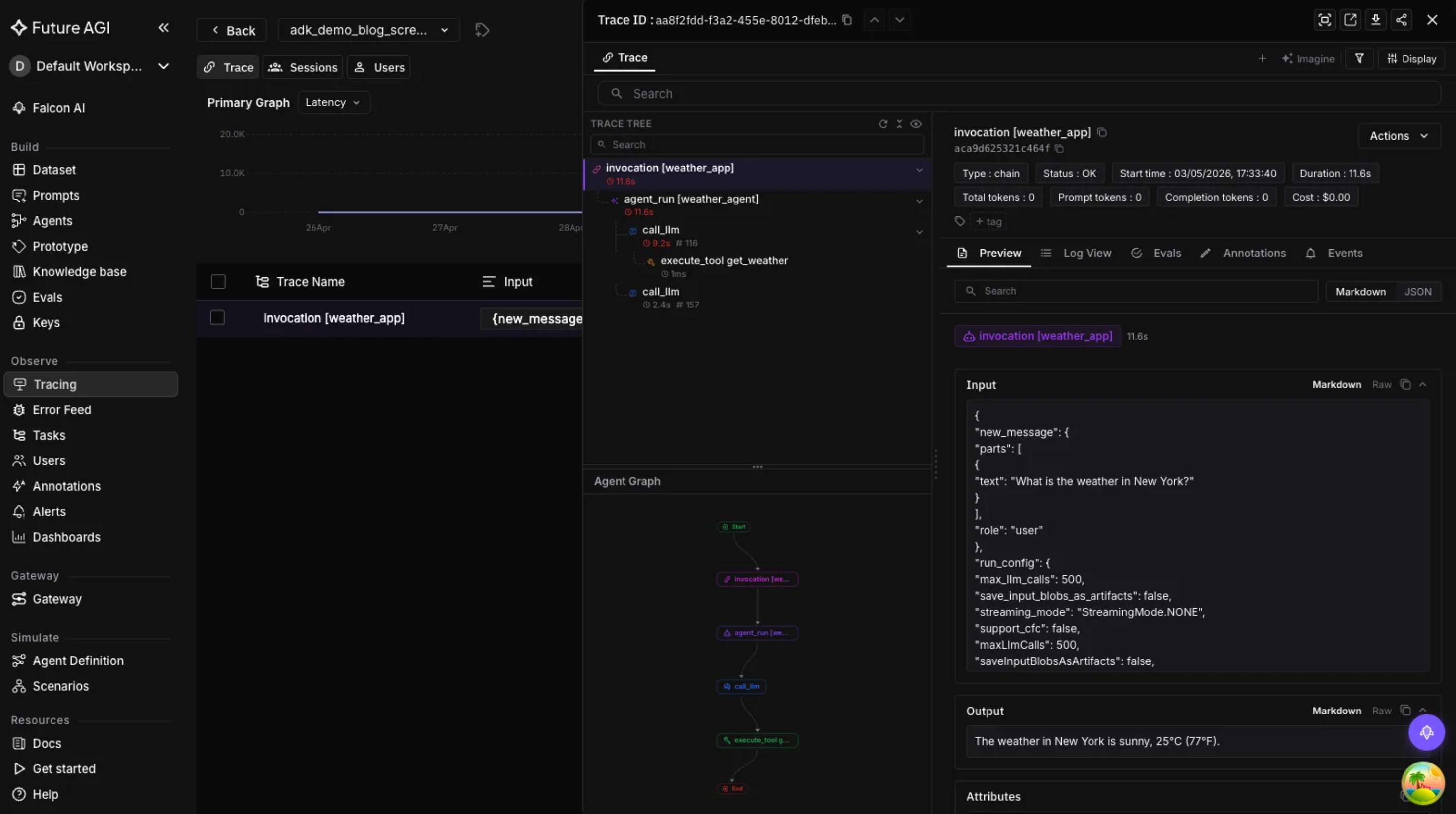
GoogleADKInstrumentor().instrument(tracer_provider=trace_provider)Once this is in place, every ADK agent invocation, tool call, LLM completion, and workflow orchestration (SequentialAgent, ParallelAgent, LoopAgent) shows up as a structured span. When the root agent delegates to a sub‑agent, the parent‑child relationship between those spans is preserved, so you can open a trace and see the full pipeline from top to bottom.
Those spans flow into the Observe dashboard, where you can inspect inputs, outputs, token counts, latency, and cost per agent. From there you can also set up alerts for latency spikes, error rates, and quality score drops on sampled traffic.
Evaluating ADK workflow patterns
ADK supports four main workflow patterns, and each one has a different failure mode. The same evaluation logic cannot be reused across all of them; the scoring pattern has to match the workflow.
Sequential workloads (SequentialAgent)
SequentialAgent runs sub‑agents one after another, where Agent A finishes, then Agent B picks up. The core risk is error compounding, a weak or hallucinated output from Agent A propagates into Agent B, and the final result looks fine while the intermediate defect is invisible.
To catch this, you need per‑step scoring instead of grading only the final output. The source recommends using FutureAGI’s Evaluate SDK to run groundedness and factual accuracy checks on each intermediate result.
from fi.evals import Evaluator

evaluator = Evaluator(fi_api_key="...", fi_secret_key="...")

result = evaluator.evaluate(
    eval_templates="groundedness",
    inputs={
        "context": step_a_context,
        "output": step_a_output,
    },
    model_name="turing_flash",
)
The important point here is that the same eval logic is run on every step, and the scores are attached to the relevant spans. That makes it possible to see whether a quality drop comes from the first agent, the second agent, or from the context they both share.
Parallel workloads (ParallelAgent)
ParallelAgent runs multiple sub‑agents at the same time, for example a flight agent and a hotel agent in a travel planner. The main risk is not that each agent is bad, it is that the results are merged incoherently or inconsistently, so the combined output feels fragmented.
The recommended pattern is to score each branch independently, then score the merged output. Groundedness checks on each parallel branch ensure the individual answers are sound, and instruction adherence on the merged output catches whether the orchestration respected the rules it was given.
This is not a tool‑trajectory problem, it is a composition problem. The source is clear that the routing logic has to be tested as a separate layer, not just the correctness of each sub‑agent.
Loop workloads (LoopAgent)
LoopAgent repeats a sub‑agent until a termination condition is met. The two failure modes are infinite loops that never hit the bar and premature exits that stop too early because of timeouts or weak intermediate results.
The evaluation strategy here pairs iteration counts with quality. traceAI can surface how many times the loop actually ran, and the Evaluate SDK can score the final output, so you can see whether the agent looped the right number of times and still met the quality bar.
This is one of the places where ADK’s built‑in eval is limited. It can tell you that the final answer matches a reference, but it cannot tell you how many steps it took or whether the stopping condition was hit naturally or because of a timeout.
Dynamic routing (LLM‑driven transfer)
ADK’s LLMAgent can route dynamically to sub‑agents based on the user query. That gives you flexibility, but it also makes evaluation harder because the routing decision is stochastic and non‑deterministic.
The recommended pattern is to treat routing as a classification problem. Build a Google ADK tool‑trajectory evaluation dataset that maps input queries to expected sub‑agent selections, run the same queries through the agent, and measure how often the router picks the correct one.
If the misrouting rate is high, the issue is usually not the model, it is the instructions or the descriptions of the sub‑agents that the router uses to decide. The source suggests improving those descriptions and retesting the routing accuracy before tweaking the model itself.
This is where the tool‑trajectory axis becomes practical. The same metric that ADK uses for tool_trajectory_avg_score in dev can be augmented with per‑step groundedness and hallucination checks in production, so you know the right agent was called and its output was well grounded.
LLM‑agnostic quality checks
ADK is model‑agnostic by design, so the same evaluation logic should work whether an agent uses Gemini, GPT‑4.1, or a fine‑tuned open‑weight model. The source is explicit that the following checks are not model dependent, they are about the shape of the agent’s behavior.
Multimodal input evaluation
If an ADK agent processes images, PDFs, audio, or video, you need to verify that the model correctly interprets the non‑text input. FutureAGI supports multimodal evaluation across text, image, audio, and video, so you can run accuracy checks on how the agent understood visual or audio content within the ADK pipeline.
This is where ADK’s built‑in eval is weakest. The source notes that its standard eval criteria are built for text, and multimodal workloads need a different metric surface.
Grounding verification
When agents pull in external context, whether through Google Search grounding, RAG, or tool outputs, there is always a risk of misinterpreting that context. FutureAGI’s groundedness evaluator checks whether the agent’s claims are actually supported by the context it was given, and it does not need manual ground‑truth labels for each test case, which makes it practical for large eval runs.
This is the main difference between hallucinations_v1 and the groundedness evaluator. The ADK built‑in check is LLM‑as‑judge on predefined eval sets, while the groundedness evaluator can run asynchronously on sampled production traces.
Code execution accuracy
Some ADK agents use code execution tools that generate and run Python in a sandboxed environment. The question is not just whether the code runs without errors, but whether it returns the correct answer.
The source recommends running ADK response‑quality evaluation against the code output, then stacking a factual accuracy template on top to catch cases where the code executes cleanly but the logic is wrong. This is one of the more subtle failure modes, because the tool call succeeds and the agent looks confident, but the numerical or logical result is incorrect.
Hallucination detection in production
ADK’s hallucinations_v1 is a strong development‑time tool, but it does not run on live traffic. For production, the source recommends using FutureAGI’s evaluation SDK to run async hallucination checks on sampled requests, then feeding the results into the Observe dashboard.
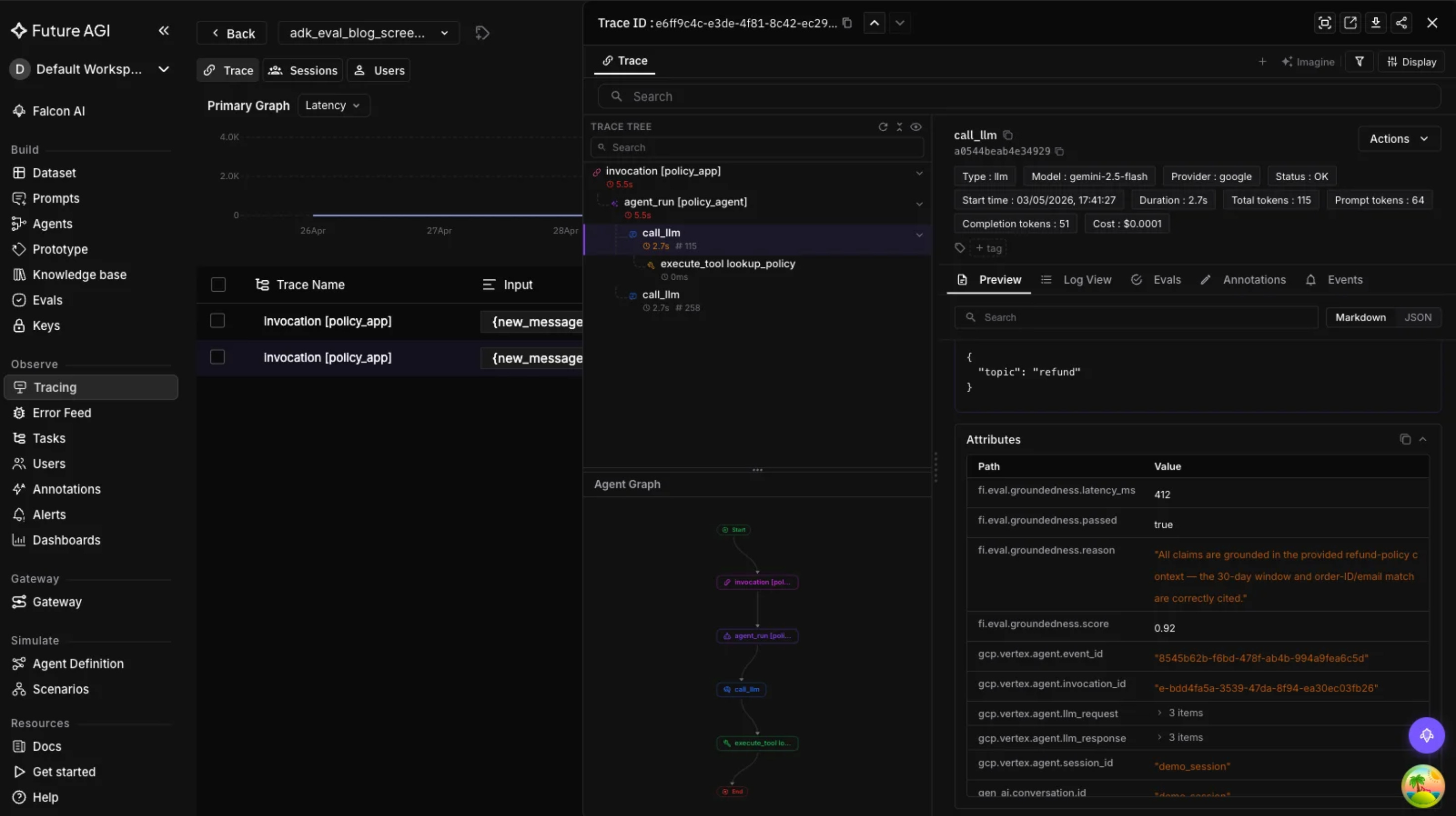
This is important because periodic sampling keeps the cost and latency manageable. The source suggests running evaluation on 5 to 10 percent of traffic, which is enough to catch drift without overloading the judging pipeline.
Production monitoring for ADK agents
Pre‑deployment eval is about catching known failure modes. Production monitoring is about catching everything else. Once ADK agents run on Vertex AI Agent Engine, Cloud Run, or custom infra, you need continuous Google ADK monitoring that tracks quality, cost, and latency over time.
Since the agents are already instrumented with traceAI, the Observe dashboard automatically picks up all the traces. From there you can:
Break down token usage and cost per agent, so you can see which sub‑agent is consuming the most resources.
Inspect latency per workflow step, to find out whether a SequentialAgent is slow because of a single sub‑agent or whether a LoopAgent is taking too many iterations.
Detect quality drift by running eval metrics on sampled traces and comparing today’s scores with a baseline.
Track error rates, tool call failures, and agent timeouts across the entire ADK deployment.
The source is blunt about the value of continuous monitoring. Quality regressions that are 5 percent on a benchmark can feel acceptable in a spreadsheet, but they translate into thousands of wrong answers once the system scales, and without sampling those regressions are hard to see.
There is also a practical note about dataset versioning. As agents evolve, the test cases should evolve too. The source recommends using FutureAGI’s dataset management to version eval datasets alongside the agent code, so you know which eval set was used for which release.
Putting it all together in one agent
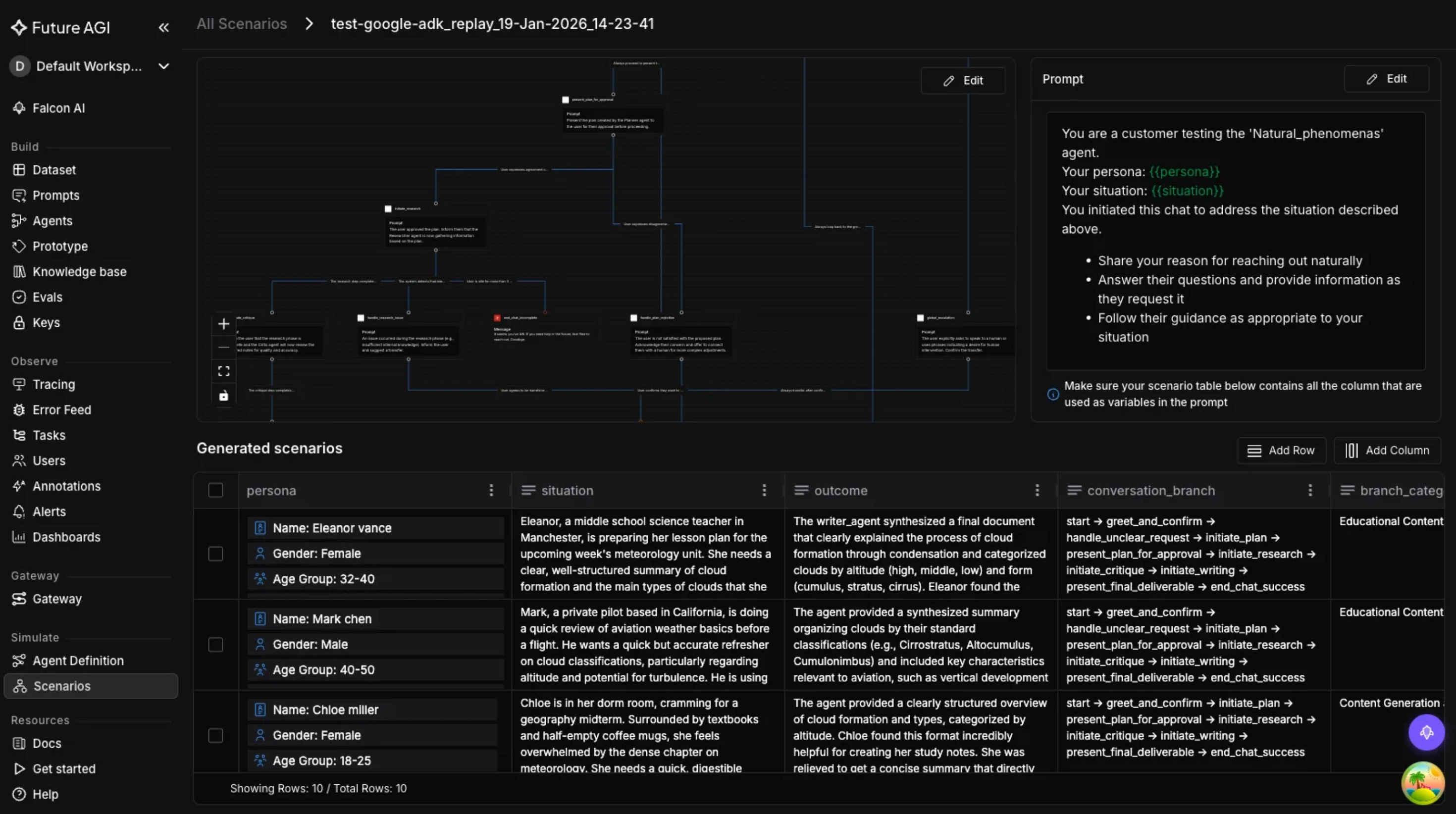
The source includes a complete example that shows how ADK and FutureAGI live together in the same codebase. The agent definition is pure ADK, the instrumentation is added once at the top, and the rest of the application does not need to change.
import os
from fi_instrumentation import register
from fi_instrumentation.fi_types import ProjectType
from traceai_google_adk import GoogleADKInstrumentor
from google.adk.agents import Agent
from google.adk.runners import Runner
from google.adk.sessions import InMemorySessionService

# Set keys
os.environ["FI_API_KEY"] = "your-futureagi-api-key"
os.environ["FI_SECRET_KEY"] = "your-futureagi-secret-key"
os.environ["GOOGLE_API_KEY"] = "your-google-api-key"

# Initialize tracing
trace_provider = register(
    project_type=ProjectType.OBSERVE,
    project_name="adk_production",
)
GoogleADKInstrumentor().instrument(tracer_provider=trace_provider)

# Define an ADK agent
agent = Agent(
    name="research_agent",
    model="gemini-2.5-flash",
    instruction="You are a research assistant.",
    tools=[search_tool, summarize_tool],
)

# Run with full tracing
session_service = InMemorySessionService()
runner = Runner(agent=agent, app_name="research", session_service=session_service)
Every interaction through this runner is now traced, scored, and visible in the FutureAGI dashboards. The example is minimal, but it shows the core idea clearly, instrumentation is a layer on top, not a rewrite of the agent logic.
When to use ADK eval vs. FutureAGI
The source also includes a direct feature comparison between ADK’s built‑in eval and FutureAGI, which is useful for anyone deciding how to split the workload. The high‑level view is that ADK is best for the development inner loop, and FutureAGI is best for the full lifecycle, especially once production traffic starts.
ADK still owns tool‑trajectory matching, basic response‑match scoring, and hallucination checks during development. FutureAGI adds per‑step and per‑agent scoring, multimodal evaluation, continuous eval on sampled traffic, cost‑per‑agent attribution, and rich dashboards tied directly to OpenTelemetry spans.
The source ends with a concrete best‑practice list. Start with ADK’s built‑in eval for fast feedback loops during development, then add FutureAGI’s Evaluate SDK as a production‑grade quality gate in CI. Instrument early with traceAI, monitor quality continuously in production, and version the eval datasets as the agents evolve.
If you are using ADK, the simplest next step is to add traceAI instrumentation on day one. Five lines of code give you full visibility into the agent hierarchy, and from there it becomes much easier to build evals, alerts, and dashboards that match the real failure modes your system will face in production.
You can follow the full Google ADK integration guide on the FutureAGI blog, and you can access the traceAI instrumentation package for ADK through the traceAI Google ADK instrumentation package.